Choose the job
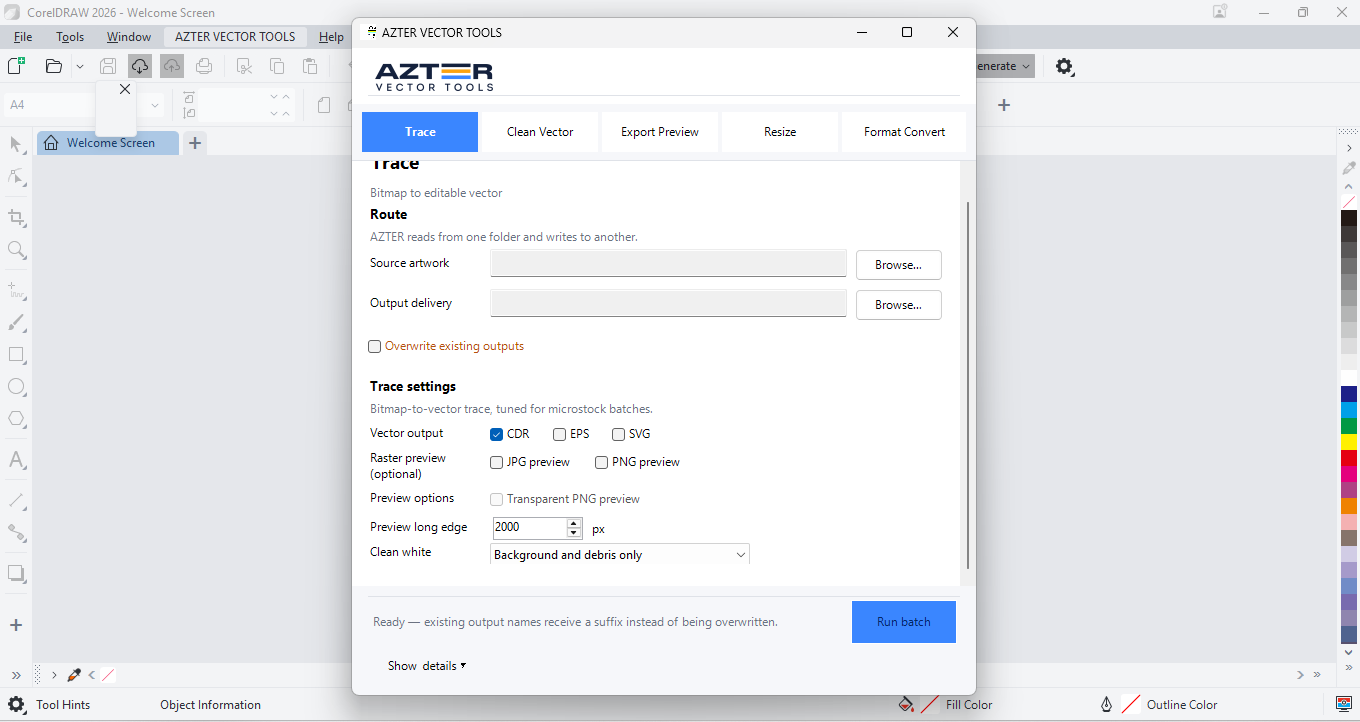
The CorelDRAW edition processes folder-based jobs. Choose the job, source folder, separate output folder, and output settings. AZTER then processes each file and shows a summary.
- Trace BMP, JPG, PNG, or TIFF images
- Clean CDR, EPS, SVG, and PDF files
- Export JPG or PNG previews
- Resize artwork to a target long edge
- Convert CDR, EPS, SVG, and PDF formats
Source files stay in place
AZTER writes results to the output folder you select and does not overwrite source files. When an output name already exists, AZTER can add a number to the new filename.
- One failed file does not stop the remaining batch
- Progress for each file and a completion summary
- Artwork is not sent to AZTER
Use it for repeatable production work
A batch works best when a set of files needs the same rule. Split the folder when sizes, formats, or cleanup policies differ.
- Microstock asset preparation
- Preview sets for review
- Consistent format handoffs
- Vector cleanup before production
Workflow
From source folder to review-ready output
- 01
Choose one job type.
- 02
Select different source and output folders.
- 03
Set the formats, size, or cleanup policy the job needs.
- 04
Run the batch and inspect the summary plus representative outputs.
FAQ
Frequently asked questions
Which CorelDRAW versions are supported?
CorelDRAW X7, X8, 2017–2026 on 64-bit Windows.
Will AZTER overwrite source files?
No. You choose separate source and output folders. If an output name already exists, AZTER adds a number. It replaces an existing file only when you turn on Overwrite.
Can I try it before purchasing?
Yes. The trial covers up to 10 source files and requires an internet connection. Purchase and activation take place from the License screen in the app.
How many devices does one license cover?
One license covers two Windows devices for either CorelDRAW or Illustrator. The editions are sold separately.