What the job does
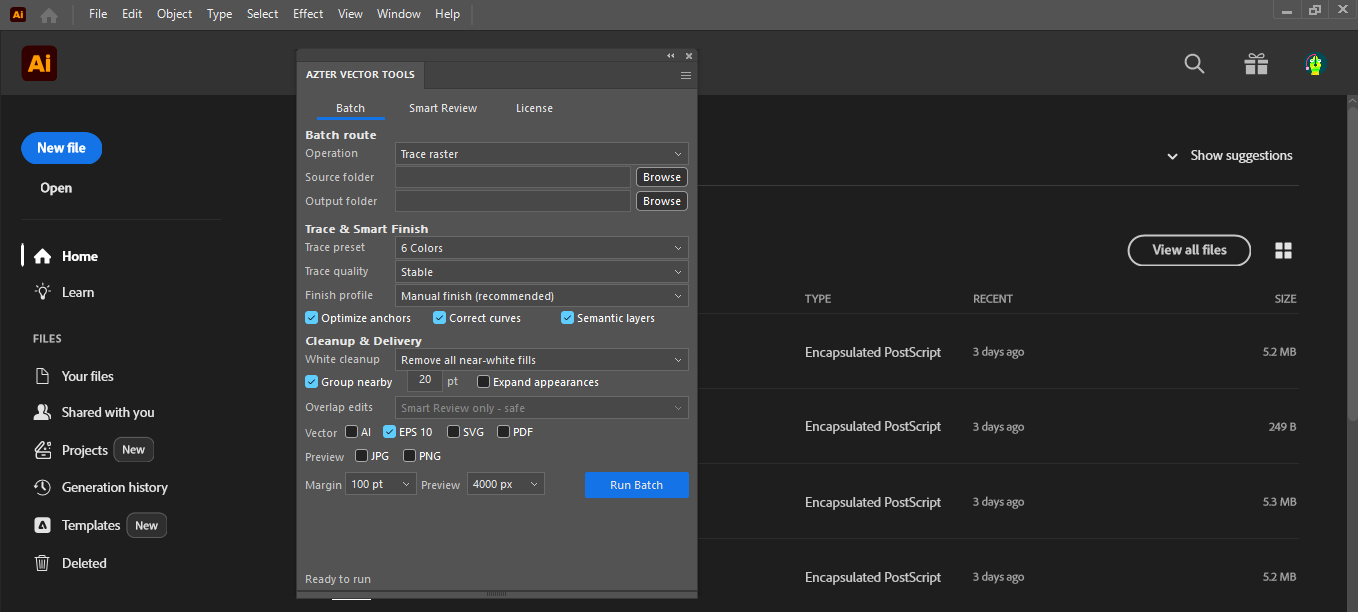
AZTER selects SVG files from the source folder, opens them in Illustrator, fits the artboard to visible artwork, and saves EPS copies to the output folder.
Source files, output, and settings
Source files: SVG files for the SVG-to-EPS workflow; the general converter also supports AI, EPS, or SVG as a selected source format.
Output: EPS files, or other different selected AI/EPS/SVG targets in the general converter.
- One selected source format per batch
- One or more different vector output formats
- Artboard fitting to visible artwork
- Separate output folder
Jobs that fit this workflow
Group files that need the same production rule. The output will be easier to review, and you can repeat the job with the same settings.
- Preparing EPS deliveries from an SVG library
- Making a compatibility copy for an older handoff
- Converting a received folder to one required format
Checks before a larger batch
A batch handles repeatable steps. Visual choices still need review.
- EPS can represent artwork differently from SVG; inspect transparency, effects, and text.
- Conversion does not repair a malformed source file.
- Keep the original SVG folder as the master set.
Workflow
Run a batch in four steps
- 01
Check that the source SVG files open correctly in Illustrator.
- 02
Select SVG as the source format and EPS as the target.
- 03
Choose a separate output folder.
- 04
Run the conversion and open a few EPS results in the destination workflow.
FAQ
Frequently asked questions
Which Adobe Illustrator versions are supported?
Adobe Illustrator CC 2019, 2020–2026 on 64-bit Windows.
Will AZTER overwrite source files?
No. You choose separate source and output folders. If an output name already exists, AZTER adds a number. It replaces an existing file only when you turn on Overwrite.
Can I try it before purchasing?
Yes. The trial covers up to 10 source files and requires an internet connection. Purchase and activation take place from the License screen in the app.
How many devices does one license cover?
One license covers two Windows devices for either CorelDRAW or Illustrator. The editions are sold separately.