
Before you begin
- Macros can express organization-specific behavior.
- Custom automation needs an owner, documentation, and version testing.
- Dedicated tools trade unlimited flexibility for a defined interface and workflow.
- Security review matters before running automation from an unknown source.
Evaluate the workflow and its maintenance
Manual processing suits a small set or a rule that has not been tested yet.
- Write down the exact source formats, operations, and outputs.
- Identify conditions that vary between files.
- Decide who owns updates after CorelDRAW changes.
- Define how source safety, errors, and output naming will be handled.
Quality checks before delivery
Open representative outputs and review the actual vector or raster file at the size and in the application that matters.
- Workflow ownership
- Supported CorelDRAW versions
- Source-file safety
- Error reporting and maintenance
Troubleshooting
Keep the source unchanged while you diagnose a failed file. Other files in the batch can continue.
- If a macro fails after an update, use its documented support path or maintainer.
- If operators apply inconsistent options, simplify the workflow specification.
- If files vary too widely, separate them before switching tools.
Workflow
Batch workflow in AZTER
Start the batch after grouping the source files and defining the output.
- 01
Use manual processing while the workflow is still changing.
- 02
Use a maintained macro for stable custom logic outside standard jobs.
- 03
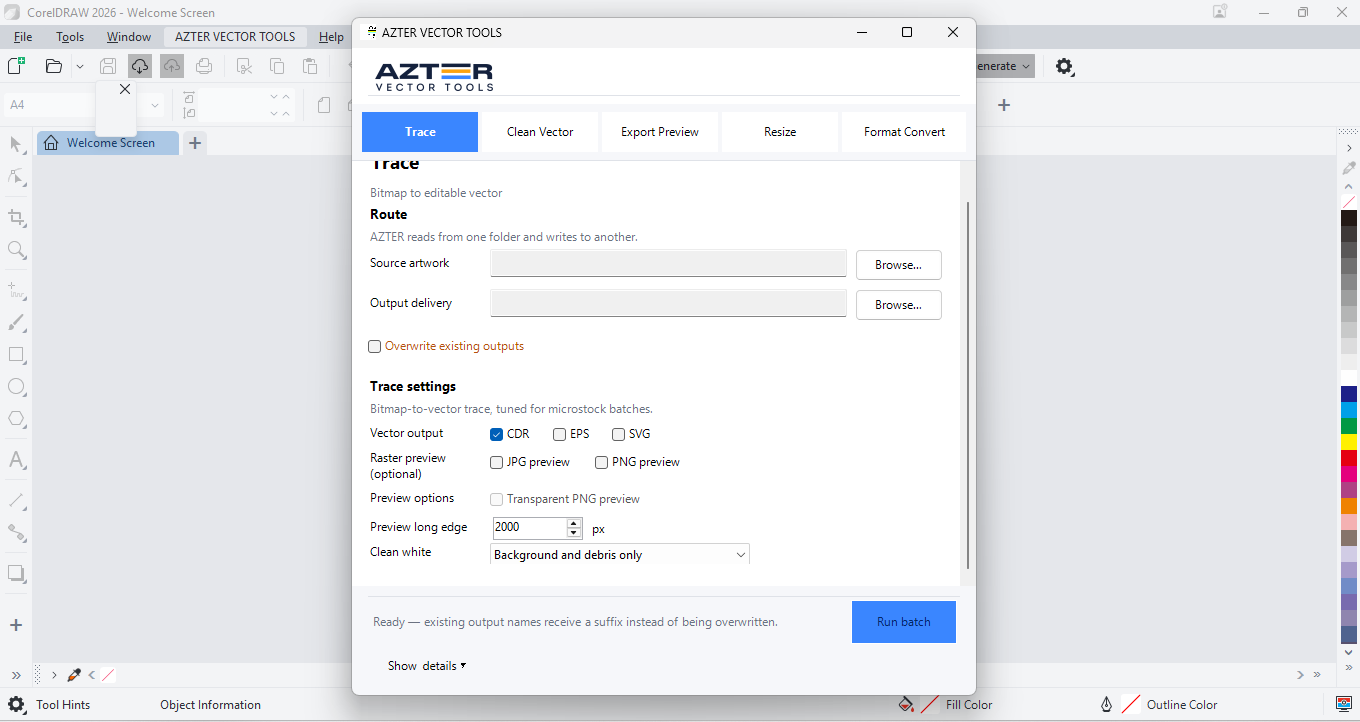
Use AZTER when work maps to Trace, Clean Vector, Export Preview, Resize, or Format Convert.
- 04
Test representative files after any application or automation update.
Macros and dedicated batch tools
| Factor | Macro | Dedicated batch tool |
|---|---|---|
| Customization | Potentially broad | Defined supported jobs |
| Setup | Develop/import/configure | Install and choose job settings |
| Maintenance | Owned by the macro user/team | Product release and support path |
| Operator experience | Depends on implementation | Consistent visible controls |
| Best fit | Unique internal logic | Recurring supported production tasks |
FAQ
Frequently asked questions
Should I test every batch on a small set first?
Yes. Use representative files, including at least one difficult example, before applying one rule to a large folder.
Does AZTER change the source files?
No. AZTER uses separate source and output folders. If an output name already exists, AZTER adds a number. It replaces an existing file only when you enable Overwrite.
What happens if one file fails?
The failure is reported and ordinary per-file failures do not stop the rest of the batch. Review the completion summary and handle the exception separately.